02 / AI Imaging / Studio tests
Studio tests
AI-assisted image making with a retoucher’s eye — generative concepts carried through to finished, print-ready artwork.
Five tests · 2026
Each set was built to hold the thing AI imagery usually can’t: one product, one face, one character — kept consistent across a whole campaign, at a print resolution that survives a 100% crop.
Everything here is print-quality. The native frames are 3712 × 4608 pixels; when a job needs more — a wall, a wrap, a billboard — the files go larger than anyone needs. Finished files for building-scale murals have gone out at 52,000 pixels wide.
Client AI work is under NDA, so the tests below were built in the studio, with invented brands, to show the method end to end.
01 · Campaign test
AERA
An adaptogenic sparkling water. One bottle and one grade — hard early sun, water in every frame — from a pour in the desert to a limestone courtyard.
A launch campaign for a sparkling water, built around one idea: the bottle has to travel. The same frosted bottle — same glass, same cap, same fill — appears in four places: a pour in the desert, hands on a rooftop above a city, a limestone courtyard, ice on stone. One hard early sun for the whole set, and water moving in every frame.
What campaign imagery like this has to hold is the product itself. The bottle was checked at 100% on every frame — the glass, the shoulder, the cap, the way the light breaks in the water — so the four images read as one shoot and can run together across print, digital and out-of-home.
02 · Product identity
CAIRN
A fragrance. The same bottle, faithful to the pixel, set into wet marble, moss, linen and raw concrete.
A fragrance identity: one faceted bottle with a dark wood cap, held faithful to the pixel and set into four art-directed worlds — wet marble, a forest floor, rumpled linen, raw concrete. The bottle never changes; the world around it does. Its proportions, the small debossed mark on the glass, the weight of the cap and the way each surface reflects in the glass stay constant across the set.
That constancy is the brief in product identity work: a fragrance house needs the same object in every execution, lit by the place it sits in rather than by a studio hovering over it. The set is built to grow — more worlds can be added and the bottle stays the same bottle.
03 · Lookbook
HALDEN
A quiet-luxury lookbook. One model, one north-window grade, six looks — the same face in every frame.
A quiet-luxury lookbook: one model, one north-window grade, six looks — camel overcoat, ribbed cashmere, charcoal suit, linen shirt, leather jacket, wool-crepe midi. The same face in every frame, on the same warm neutral ground, in the same soft light.
A lookbook reads as one shoot only if the person stays the same from look to look — face, skin, hair — and that is exactly what AI imagery tends to lose. The frames are full-figure so cut, fit and drape carry at page size, and they are graded as a single session so they sit side by side without matching work.
04 · Brand character
FENN
An outdoor brand and its mascot. A designed CG character — same face, same bandana — living in a real, photographically lit wilderness.
An outdoor brand and its mascot: a designed CG fox — same face, same bandana — living in a real, photographically lit wilderness. Trailhead at dawn, campfire at dusk, a river bend, a ridge at dusk. The character is drawn once and then carried into places that behave like locations: the light is the location’s light, the ground takes its weight, the fire warms its fur.
Brand characters are the hardest thing to keep consistent in AI imagery — a mascot that drifts between executions stops being a mascot. This set holds one character across four environments and two times of day, which is what a brand needs before the character can be built out across a campaign.
05 · Production-grade
Built to survive a 100% crop
A single hero frame at native 4K. The crop is 1:1 — no upscaling, no sharpening.
The hero frame is 3712 × 4608 pixels — native, not upscaled — enough to print a full magazine page at 300 ppi with room to spare. The crop beside it is 1856 × 2320 pixels of the same file, shown one image pixel per screen pixel: no enlargement, no sharpening. The hobnail dial, the brushed case, the crown and the grain of the strap are exactly as they are in the file.
This is where most AI imagery gives out: finished at thumbnail size, soft and noisy at print resolution. Work for print, out-of-home and retail has to survive this crop, which is why it is shown rather than described. And native is the floor, not the ceiling: when a job calls for a wall or a wrap, the files go larger than anyone needs.
Full frame · 3712 × 4608 px
The amber frame is the crop; the filled window is the part of it showing at 1:1.
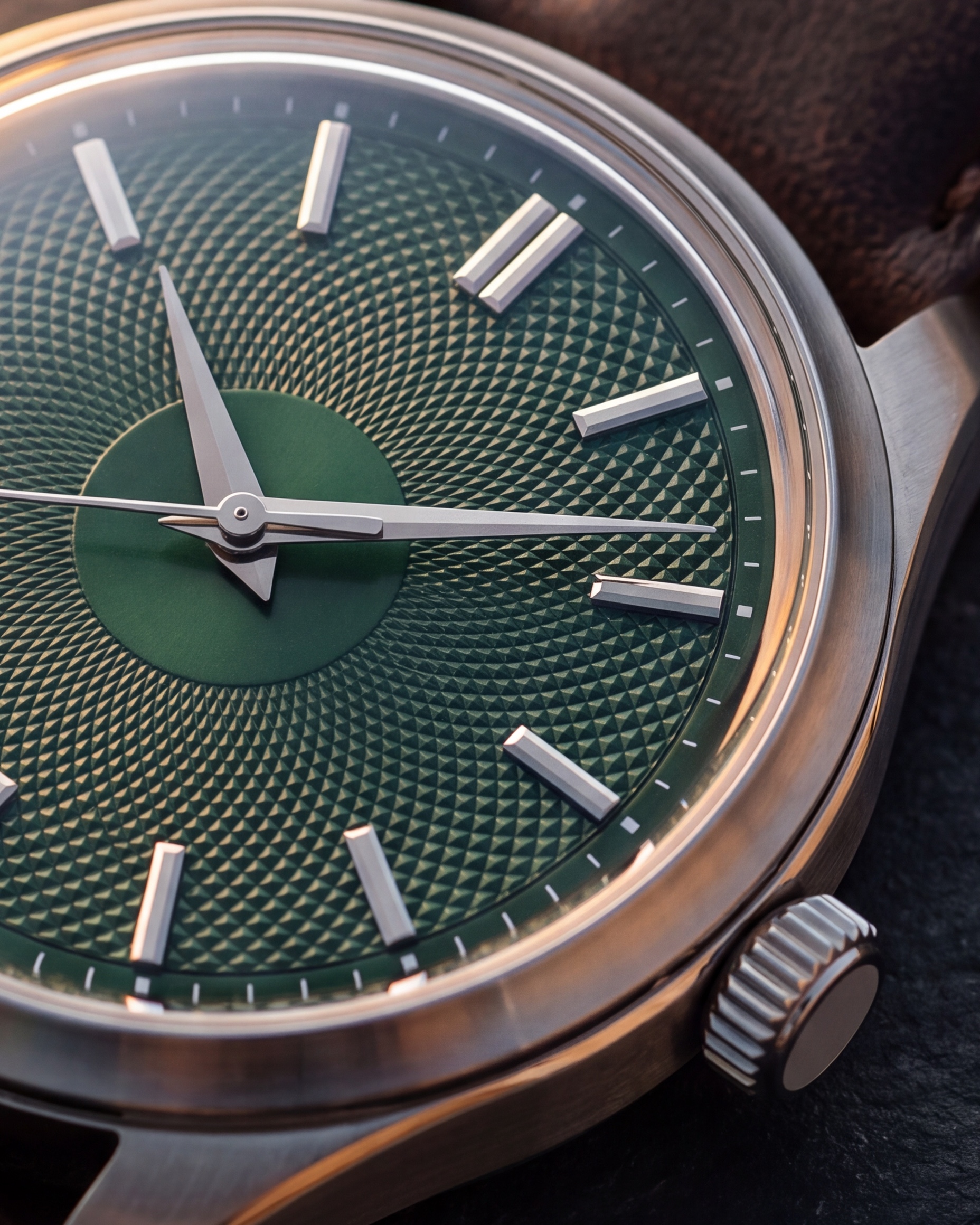
100% crop · 1856 × 2320 px
Of the same file — one image pixel per file pixel. Drag to pan.